
Business Desktop Deposit Capture
Save time with a desktop check scanner for on-site batch check processing
Call us at 800-341-9911 ext. #3040
High-Volume Check Processing
Royal Credit Union's desktop deposit capture allows Wisconsin and Minnesota businesses to scan and deposit checks electronically, reducing trips to a branch and improving cash flow management. If your business handles lots of checks, business desktop deposit capture is a great way to save time. Our business mobile app includes check deposit for smaller volumes of checks, but desktop deposit capture can make quick work of stacks of checks! Desktop deposit capture also allows larger deposit totals than business mobile deposit.

Check Batch Advantages
Processing checks in a batch may mean faster funds availability in your Royal accounts, which can improve business cash flow. Electronic deposit records also include time-saving search and report options for your business.
On-Site Convenience
Businesses process check batches at their location instead of bringing them to a Royal office. This saves time and may mean funds are available sooner.
Works With Your Computer
A browser-based web interface controls the desktop check scanner machine connected to your Windows or Mac computer.
Support For Multiple Users & Sites
The business remote deposit administrator can set up additional business users with individual access and permissions. Online training resources are provided.
Check Scanner Choices
Choose an automated multi-feed scanner to quickly process an entire stack of checks, or a single-feed scanner for smaller batches. The scanner is purchased by the participating business.
There are no setup fees or scanner fees to use business desktop deposit capture at Royal, but businesses must purchase the check scanner and applicable checking account per-item charges apply. Approval for a business credit application is required to use business desktop deposit capture at Royal Credit Union.
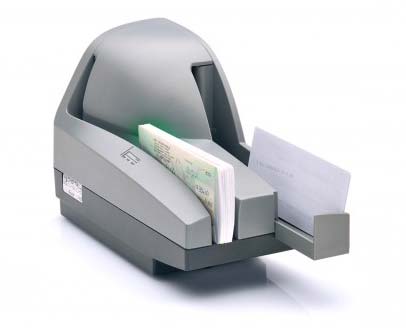
Actual scanner may vary
Learn More About Business Desktop Deposit Capture
Frequently Asked Questions
What is business desktop deposit capture at Royal Credit Union?
Business desktop deposit capture is a service that allows businesses to process checks in batches using a desktop check scanner connected to a computer at their own location. It saves time by allowing high-volume check processing without visiting a Royal office. Desktop deposit capture also allows larger deposit totals than business mobile deposit.
How does desktop deposit capture work?
A browser-based web interface controls the desktop check scanner machine connected to your Windows or Mac computer. You can choose an automated multi-feed scanner to quickly process an entire stack of checks, or a single-feed scanner for smaller batches. Businesses process check batches at their location instead of bringing them to a Royal office.
What are the benefits of using desktop deposit capture?
Processing checks in a batch may mean faster funds availability in your Royal accounts, which can improve business cash flow. Electronic deposit records include time-saving search and report options for your business. On-site processing saves time and may mean funds are available sooner.
Are there fees for business desktop deposit capture at Royal Credit Union?
There are no setup fees or scanner fees to use business desktop deposit capture at Royal. However, businesses must purchase the check scanner, and applicable checking account per-item charges apply.
Does desktop deposit capture support multiple users and locations?
Yes. The business remote deposit administrator can set up additional business users with individual access and permissions. Online training resources are provided. The service supports multiple sites so businesses with more than one location can benefit.
How does desktop deposit capture compare to mobile check deposit?
Royal's business mobile app includes check deposit for smaller volumes of checks, but desktop deposit capture is built for higher volumes. It can process entire stacks of checks quickly using a multi-feed scanner and allows larger deposit totals than business mobile deposit. It also provides batch processing with electronic records, search capabilities, and reporting options that aren't available through mobile deposit alone.